

Prerequisites
To create a schema, the following prerequisites must be met:- CLI installed - install the Miru CLI on your development machine and authenticate using the login command
- Config type created - create a config type to house the schema
Define the schema
Begin by defining your schema using a supported schema language. You can find example schemas in our getting-started repository. If you’re not sure which language to use, we recommend starting with JSON Schema — it’s the most widely used and easiest to get started with. To get started quickly, feel free to use an empty schema, which considers all config instances as valid.Annotations
Annotations are a convenient way to store schema metadata with your schema. Most annotations are optional, but some are required for Miru to process the schema correctly.The config type is a required annotation that identifies the config type to which a schema belongs. Below is the syntax for annotating your schema with the config type slug.Examples:
mobility, safety-features, perceptioninstance file path
The instance file path is the file system location that config instances (for this schema) are deployed to relative to the Examples:
/srv/miru/config_instances directory.This annotation is optional and defaults to {config-type-slug}.json, which deploys config instances to /srv/miru/config_instances/{config-type-slug}.json on a given device./v1/mobility.json, /safety.json, configs/perception.jsonGit metadata
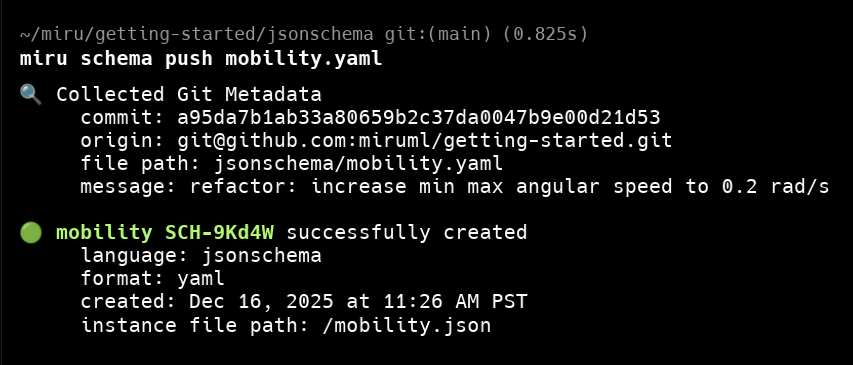
When pushing a schema to Miru, the CLI captures Git metadata from the local Git repository from which the CLI is run:- Commit SHA - the SHA of the current commit that the schema is defined in
- Origin URL - the remote URL of the Git repository
- File path - the path to the schema file within the repo
- GitHub
- GitLab
- Bitbucket
Requirements
To be able to capture Git metadata, schemas must meet the following requirements when uploading from the CLI:- The schema must be defined in a local Git repository
- The Git repository must have a remote URL (e.g., GitHub, GitLab, Bitbucket).
- The schema’s latest changes must be committed to the Git repository before pushing to Miru (cannot be dirty or unstaged)
Push the schema
Once you’ve defined a schema and committed it to Git, you’re ready to push it to Miru via the CLI. To push a schema, replace{path/to/schema.yaml} with the actual path to the schema file.
New schemas
If the schema content does not match any existing schemas, a new schema is created.command
Existing schemas
If a schema with equivalent content already exists, a new schema is not created. However, the Git metadata is attached to the existing schema.output