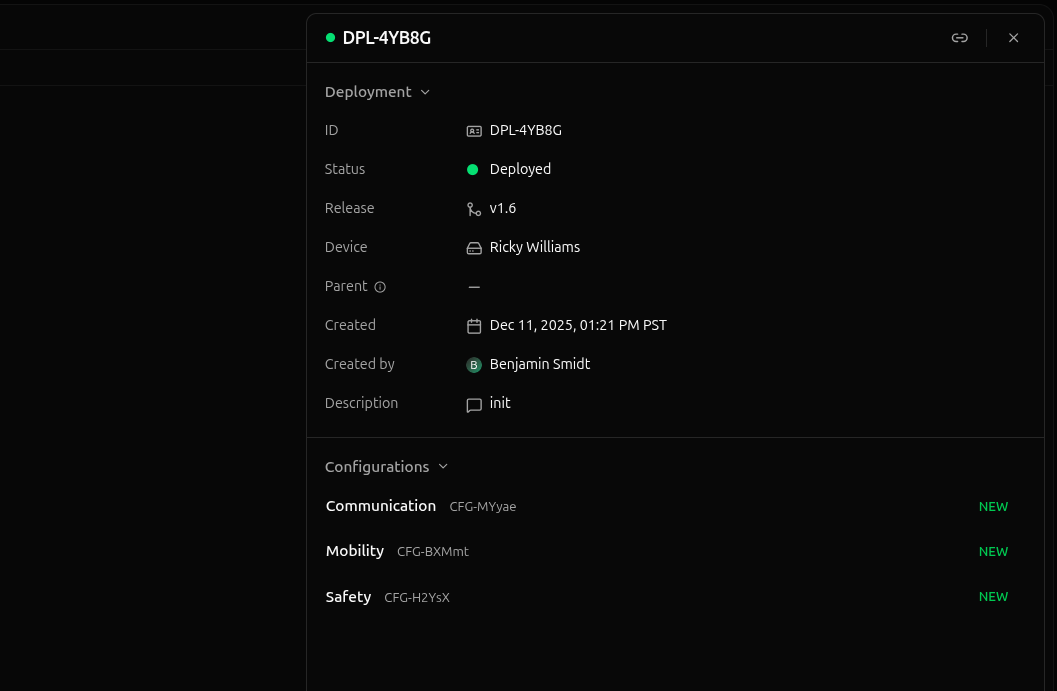
A deployment is a set of config instances delivered to a device for consumption by your software.Deployments tie together config instances, releases, and devices to simplify configuration management and delivery.Deployments have a variety of constraints designed to simplify configuration updates:
A deployment’s config instances are immutableOnce created, the configs in a deployment cannot be updated. A new deployment must be created to modify a device’s configs.
Deployments belong to a single releaseDeployments belong to exactly one release, whose config schemas are used to validate the configurations in the deployment.
Deployments belong to a single deviceDeploying the same configs to two devices requires a deployment for each device.
Deployments are one-time useOnce removed from a device, a new deployment must be created to restore a device’s previous configurations.
The status is a merged property of the activity status and error status fields, with error states taking precedence over activity states when errors are present.So, if the error status is none, then the status is simply the activity status. If the error status is not none, then the status is the error status.Below are examples of status values for different activities and error states.
Staged in a release’s staging area to be deployed at a later time
Per-Device EditingEach device has a dedicated config editor for viewing and editing its configurations. Changes made in the config editor are immediately deployed to the device.The config editor deals only with a single device’s configurations. It does not support multiple devices at once nor does it support staging new deployments.For more information, check out the config editor documentation.Release StagingStaging a deployment is the process of creating a new deployment in a release’s staging area to be deployed in the future. Staging is primarily used to rollout a new release, providing an unobstrusive place to create and review deployments before being deployed to devices.A release’s staging area is also useful for batch operations. Deployments can be created, deployed, and archived in bulk, which helps manage large numbers of deployments at once.For more information, check out the staging area documentation.
The status is a merged property of the activity status and error status fields, with error states taking precedence over activity states when errors are present.So, if the error status is none, then the status is simply the activity status. If the error status is not none, then the status is the error status.Below are examples of status values for different activities and error states.
The target status is the desired state of a deployment. There are three possible target statuses.
Target Status
Description
staged
Deployment doesn’t want to be deployed, but may be deployed in the future
deployed
Deployment wants to be delivered to its device
archived
Deployment no longer wants to be deployed; it can never be deployed again
With StagingIf a deployment is staged before being deployed, the diagram below shows the valid transitions between target statuses.Without StagingOf course, many deployments skip staging and deploy immediately (such as those deployed from a device’s config editor). The diagram below shows the valid transitions between target statuses for a deployment that is immediately deployed.One-Time UseAs you can see, the target status can only move forward, never backwards.Once a deployment’s target status has been set to deployed, it can never be set to staged again. Similarly, once a deployment’s target status has been set to archived, it can never be set to deployed again.This is intentional—deployments are one-time use. Once a deployment has been deployed, it cannot be redeployed. You must create a new deployment with identical content to roll back.
The activity status is the last known state of a deployment.We use the last known state intentionally — poor network connectivity can prevent devices from immediately syncing their activity state with the cloud. In practice, this isn’t too common. However, it’s still a critical point to keep in mind.There are six possible activity states for a deployment.
Activity Status
Description
staged
Deployment has been created and is ready to be deployed
Deployment is waiting for the device to be so it can be delivered to the device
deployed
Deployment has been delivered to the device, and its configurations are available for consumption
removing
Deployment will be removed from the device as soon as the device is online
archived
Deployment is available for historical reference, but can never be deployed again
With StagingWhen a deployment is staged before being deployed, it can pass through all the listed activity states. Below is a diagram of the valid transitions between activity states.Deployments start in the staged state. If a deployment drifts, it transitions to needs review and must either be restaged or archived.Eventually, the deployment is queued for delivery to the device, where it passes through the primary deployment lifecycle from queued to archived.Without StagingDeployments which are immediately deployed and skip the staged state have a simpler lifecycle. They simply go through the primary deployment lifecycle from queued to archived.One-Time UseAs with the target status, activity states can only progress forward since deployments are one-time.
The error status is the last known error state of a deployment. Again, we use the last known state intentionally — poor network connectivity can prevent devices from immediately syncing their error state to the cloud.The error status is independent of the activity and target statuses. The error status does not imply any particular activity or target state, and vice versa. The error status is only concerned with errors encountered during deployment.There are three possible error states for a deployment.
Error Status
Description
none
There are no errors with the deployment
retrying
A non-fatal error has been encountered; the agent is retrying to fulfill the deployment’s target status
failed
A fatal error has been encountered; the deployment is (or will be) removed from the device and archived
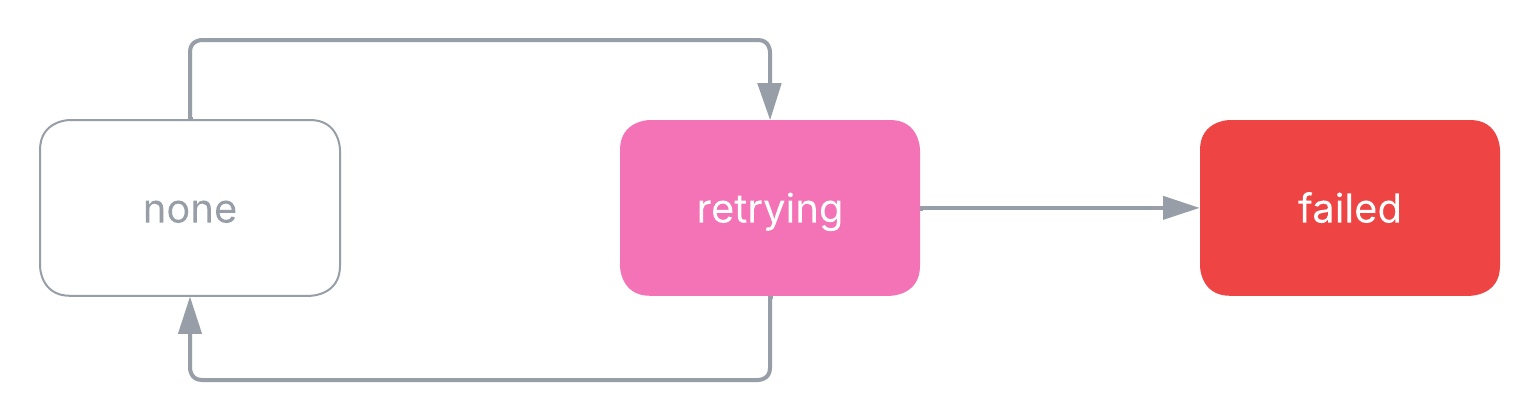
Below are the valid transitions between error states.Deployments start in the none error state. If no errors are encountered, the deployment remains in the none error state for the duration of its existence.Non-Fatal ErrorsIf a non-fatal error is encountered, the deployment transitions to the retrying error state. Non-fatal errors include unexpected network drops, sudden power cycles, and similar events.If the agent recovers the deployment from the error, the deployment transitions back to the none error state once the deployment’s target status is reached.On the other hand, as long as the agent is unable to recover the deployment, the deployment remains in the retrying error state. The agent continually attempts to reach the deployment’s target status, using exponential backoff to prevent resource throttling.If the deployment is stuck in the retrying error state, try replacing or archiving the deployment to allow the agent to start fresh.Fatal ErrorsIf a fatal error is encountered, the deployment transitions to the failed error state, is removed from the device, and marked as archived.


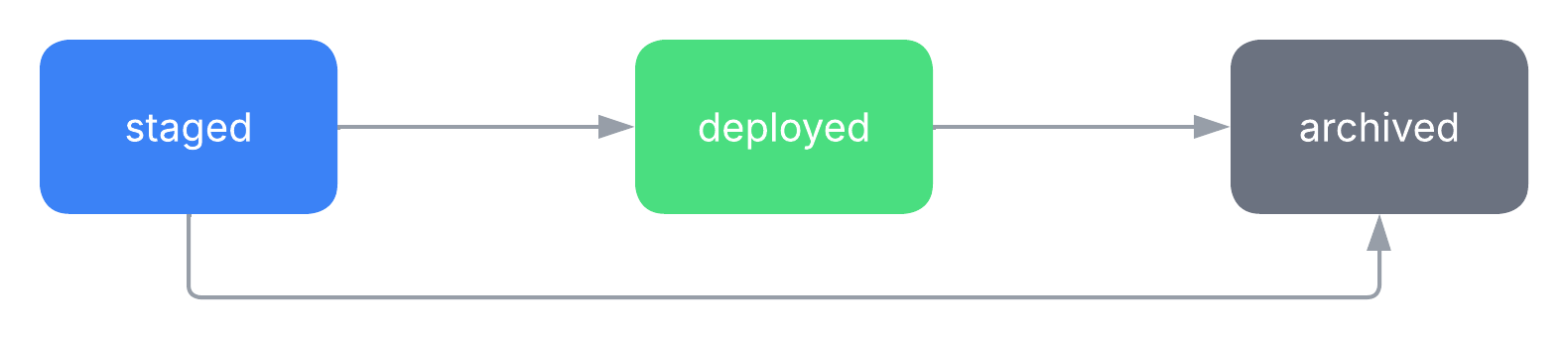 Without Staging
Of course, many deployments skip staging and deploy immediately (such as those deployed from a device’s config editor). The diagram below shows the valid transitions between target statuses for a deployment that is immediately deployed.
Without Staging
Of course, many deployments skip staging and deploy immediately (such as those deployed from a device’s config editor). The diagram below shows the valid transitions between target statuses for a deployment that is immediately deployed.
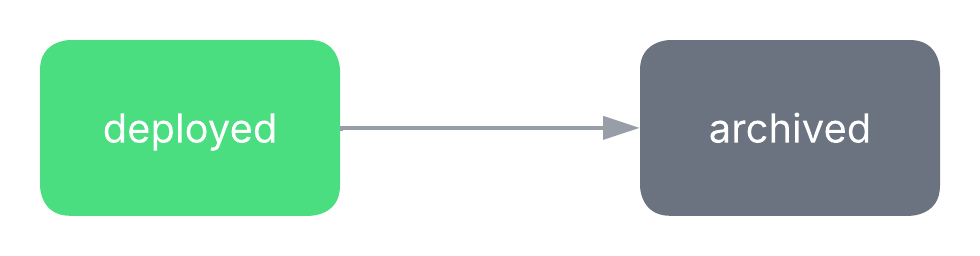 One-Time Use
As you can see, the target status can only move forward, never backwards.
Once a deployment’s target status has been set to
One-Time Use
As you can see, the target status can only move forward, never backwards.
Once a deployment’s target status has been set to 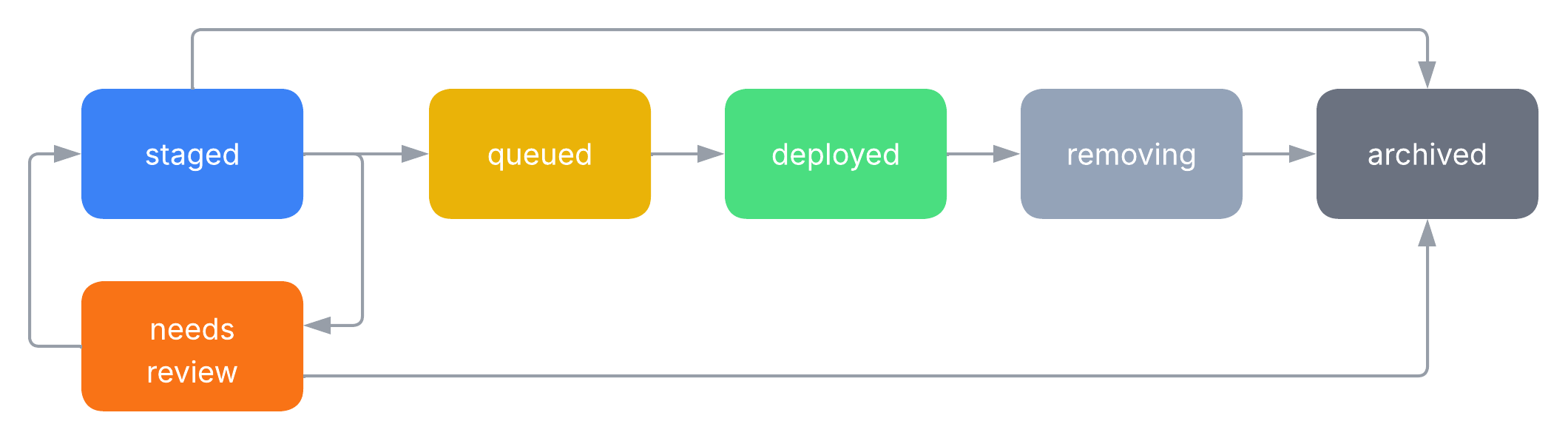 Deployments start in the
  One-Time Use
As with the target status, activity states can only progress forward since deployments are one-time.
One-Time Use
As with the target status, activity states can only progress forward since deployments are one-time.
 Deployments start in the